Adding a Supra keybox to a listing is easily done directly from Matrix MLS. An additional walkthrough by the California Regional MLS can be found here: https://kb.crmls.org/knowledgebase/managing-supra-keyboxes/
First, navigate to your listing in Matrix. You should see a menu like this near the top of the page:

The blue symbols are lockbox functions, from left to right they are: ADD, REMOVE, VIEW ACTIVITY, or VIEW SETTINGS for a lockbox. You must first ADD a lockbox to the listing before you can remove, view activity, or view settings.
To add a lockbox, click the + Icon, you will then be taken to a page like this:
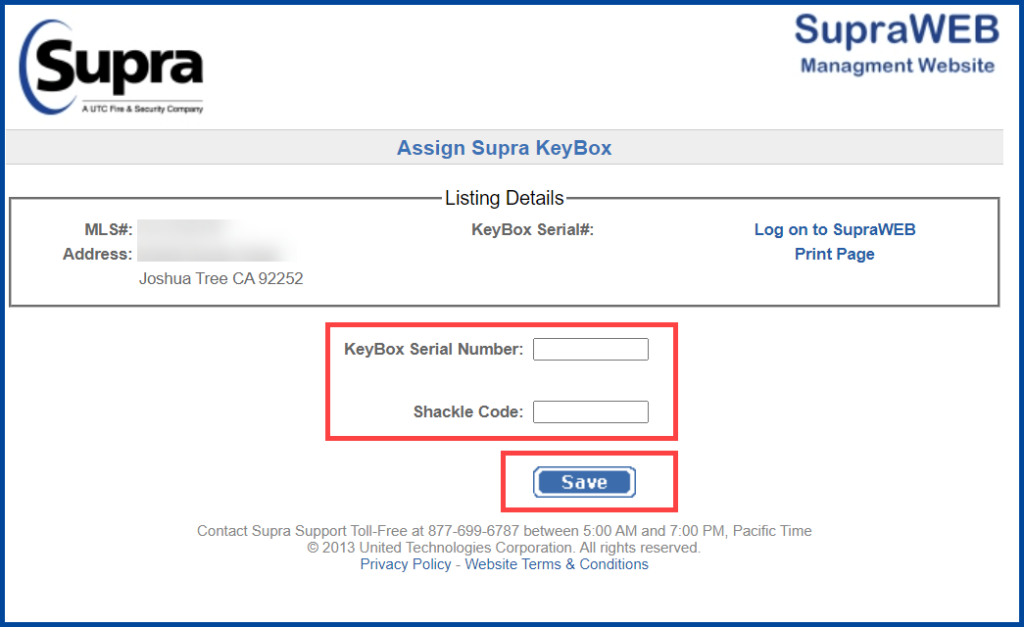
You will input the lockbox serial number and shackle code (Shackle codes can be found in the agent roster/info file, codes vary by office location). Once you have successfully assigned a lockbox to your listing, it will sync the listing address and lockbox serial number in Matrix, and ShowingTime.